Updated OrderFlow design and desktop experience
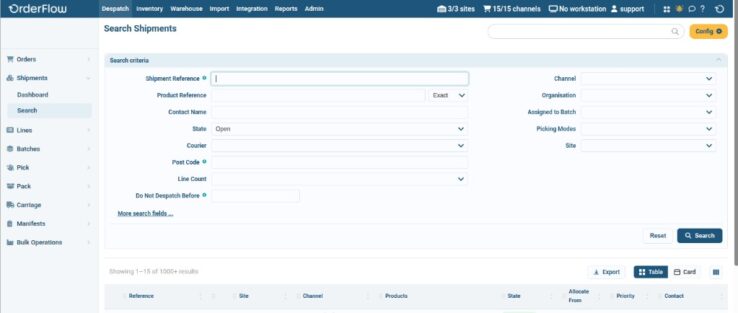
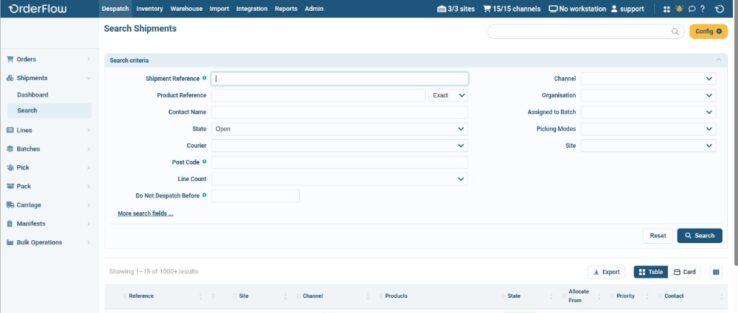
OrderFlow 4.6.2 adds a new Vilnius desktop theme with a cleaner, more consistent look across the classic menu-based interface. Search results on many screens now use a shared results grid with more ways to view and organise data. Desktop users can also sign in by scanning the same ID badge used on handheld devices, with an optional PIN step for added security.
- Vilnius theme. The new theme updates typography, colour, spacing, borders, buttons, tables, forms, alerts and the header and navigation of the classic desktop. It matches the layout and behaviour of the existing Tangier theme, so operators keep familiar workflows. Vilnius is now the default theme, and some new functionality will only be available with it. We therefore strongly encourage users to switch from earlier themes, which will be phased out in future releases.
- Search results grid. Search results that previously used the jqGrid table are being moved to a shared results grid. Operators can switch between a table and a card view, and show, hide, reorder or resize columns. The grid remembers the chosen view and column layout in the browser, and the layout can be reset. Where export is offered, the current page or the full set of results can be downloaded as CSV or Excel. From 4.6.2.1, Admin → Users → List also uses the grid, with search criteria above the results. When editing users, Previous and Next follow the filtered results.
- Badge scan login. On the desktop login screen, users can scan their ID badge, the same one used on handheld, instead of typing credentials. This suits packing stations and touchscreens without a keyboard or mouse. A touch-friendly switch moves between scan login and normal login, and the browser remembers the last choice. OrderFlow can also ask for a secondary numeric PIN after the badge scan, with an on-screen keypad for devices without a keyboard.
Trade compliance and customs
OrderFlow 4.6.2 adds product fields for the three EU product identifiers (PIDs) required under EU rules for qualifying
B2C distance sales of imported goods into the EU from
1 November 2026. Carriers need this data to complete customs declarations on affected shipments. The
DPD and
DHL API integrations can include these identifiers on
non-domestic consignments where customs information is already required. OrderFlow can also fill in a product’s global customs details using a lookup keyed by a
US tariff classification code supplied on the product feed.
- Product identifier fields. The product detail page has a Product Identifier Fields section under Customs Information, covering the merchant (M-PID), manufacturer or supplier (NS-PID) and standardised (S-PID) identifiers. Product imports can populate blank PID fields using the product reference, barcode or supplier part number as defaults. These may need replacing with values that meet your regulatory and carrier requirements. Products can also be prevented from being activated until their PID values are set.
- Supplier part numbers. To support the manufacturer identifier, supplier associations now have a part number field. You can enter it when adding a supplier to a product, or import it, either with product data or as separate supplier product records. Product imports use it to fill the manufacturer identifier.
- DPD and DHL. For non-domestic shipments where the DPD API integration (DPD and DPD Local) or the DHL API integration already requires customs declaration data, the merchant and manufacturer identifiers must be present in the courier request. OrderFlow does not send the consignment creation request if either value is missing on a goods line. The standardised identifier is included where it is held on the product.
- Customs lookup. Where a product feed supplies a US tariff classification code, for example from Shopify, a product import transformer can look up the matching global customs details (such as HS code, description and composition) in a spreadsheet you maintain. You upload the spreadsheet to an application property.
Courier and returns integrations
Release 4.6.2.1 adds three courier and returns capabilities. For
Intersoft Sapient, OrderFlow can now mark shipments as
Picked when they are packed and manifest only those. When courier validation fails, OrderFlow can send a JSON notification to an external system. For sites using
Loop Returns, OrderFlow can bring returns in from Loop and report the outcome back.
- Intersoft Sapient manifesting. Previously, printing a label released the consignment on Sapient. Creating a manifest included all consignments released on that account, including shipments that were still being packed. OrderFlow can now tell Sapient a shipment is Picked when it is packed, and request a manifest for Picked shipments only. This matters most with several collections a day.
- Failed courier validation notification. When Validate courier fails, OrderFlow can send a JSON message to an external endpoint. It identifies the order and shipment and lists each courier error, with the courier, date, error code and message. This lets customer services or middleware see why a shipment failed and which order it belongs to. The same message is visible under Integration → Remote messages.
- Loop Returns. For sites using Loop Returns, OrderFlow fetches new and open returns on a schedule. Return lines that have not been applied can be edited, for example to record the item’s condition. Once processed, OrderFlow reports the outcome back to Loop, including any lines that will not be refunded. Changes made to a return in Loop after it has been fetched are not picked up.
Inbound and receiving
This release includes four notable changes to inbound and receiving. The desktop ASN detail now shows progress against each line while a delivery is being received. Integrations can amend an ASN through the API until receiving starts. Handheld goods-in can take quantities in cases rather than units. Suppliers can be deactivated without losing their history.
- ASN receiving progress. While an ASN is being received, the ASN detail screen shows Expected, Received and Outstanding for each line, so operators can spot a shortfall before the delivery is applied to stock. Opening a line shows the receipts booked against it. This applies to deliveries that adjust stock as each line is received.
- ASN updates through the API. Integrations can now amend an ASN that is still Receivable: change a line quantity, remove a line or add a new product line, rather than recreating the ASN. Once receiving has started, updates are no longer accepted.
- Receiving by case on handheld. For products with a default case quantity, handheld goods-in can prompt for the number of cases, show the units per case and record the resulting units. The operator can switch a line to unit entry, for example when a pack is damaged or incomplete.
- Deactivating suppliers. A supplier can now be deactivated rather than deleted. It is no longer offered when creating new purchase orders, deliveries, ASNs or return lines, and imports that reference it are rejected. Existing documents continue to work, and the supplier stays visible in searches and on historical records.
Putaway
Handheld putaway can now show existing stock of the same product on the target location step, so operators can compare lots and best-before dates without leaving the flow. Putaway tasks can be configured to show this list.
Stock management and visibility
Handheld stock check can now be set up to recognise barcodes for pack codes and ratio packs, allowing operators to record pack composition once and subsequently count stock by pack. Location stock history now also shows licence plate nest and unnest activity for that location.
Separately, Product sales summary has a new Backfill control. It shows how far back summary data has been built for each organisation and lets authorised users extend it.
- Pack codes on stock check. Where pack or ratio barcodes are not set up as products in advance, OrderFlow can recognise the barcode during handheld location stock check by its pattern. The operator opens one physical pack and records the constituent SKUs and quantities; OrderFlow saves that composition as a pack product. From then on the operator counts packs at each location. This setup is required once per pack code. Pack stock is not sent to external inventory feeds, and the stock of the individual SKUs is not affected until packs are broken down in a later step. Loose items continue to be counted on their own SKUs.
- Licence plate activity in location history. The location stock history screen now has a section listing licence plate nest and unnest events for that location, so you no longer need to switch to the licence plate screens. Stock movements inside a nested licence plate still appear against the licence plate’s own location, not the physical location.
- Product sales summary backfill. On the Product sales summary screen, a Backfill control shows how far back daily summary data has been built for each organisation. Authorised users can pick an organisation and a date range and start a backfill to extend coverage. Progress is shown until it completes.
Despatch and packing
Products can now be marked as not needing outer packaging, for items that ship in their own retail carton. The advanced dimension-based packing and tote planning capabilities have been reorganised into a separate module that extends the standard dimensions module. Sites that already use those capabilities need both modules available when moving to this release.
- Packaging not required. The product edit screen has a Packaging not required option for items that can be sent out as they are. The same value can be supplied on product import. It is held on the product so despatch rules and integrations can use it, rather than inferring it from product type or category.
- Dimensions module. The standard dimensions module continues to provide core dimension resolution and visualisation. A separate module builds on it and delivers cartonisation planning (including fallbacks when a full search would be too heavy), splitting shipments or packages by that plan, and pick-tote selection where those flows are in use. Cost-aware planning applies where the planning profile supports it.
For existing customers
Please see
this link for the list of issues addressed in the releases from 4.6.2 to 4.6.2.1.
If you’d like to discuss how these enhancements apply to your specific operation, or to schedule an upgrade to your test environment, please get in touch or raise a ticket through the
support portal.

 enquiries@orderflow-wms.co.uk
 +44 (0)1249 750564